Construction cost tracking is the process of monitoring, recording, and analyzing all expenses incurred throughout a construction project. For contractors, the goal is to understand how project spending compares with the budget and to catch potential margin problems before they affect cash flow and profitability.
Regularly reviewing cost management also helps teams forecast remaining expenses and adjust spending as the project progresses.
Construction companies typically track costs in one of three ways: spreadsheets, accounting software, or construction management software with built-in cost-tracking. Each approach offers different levels of financial visibility, and we'll compare their advantages and limitations.
We’ll also walk you through the key steps for tracking construction costs accurately, explain how to make sure no major expenses are overlooked, and clarify the difference between cost tracking and cost estimating.
What Is Construction Cost Tracking?
Cost tracking is the ongoing process of recording and monitoring project expenses against the approved budget. These expenses include:
Materials and equipment
Labor and subcontractors
Permits and fees
Change orders
Overhead and other project expenses
Tracking these expenses also gives you historical cost data you can use to build more accurate estimates for future projects.
Construction costs can be classified in two ways:
The #1 newsletter for the trades.
By their relationship to the project:
Direct costs: Expenses directly associated with a specific construction activity or component. Examples include foundation concrete, construction materials, and installation labor.
Indirect costs: Expenses that support construction operations but aren't directly assigned to a specific activity or project. Examples include shared project management expenses, administrative overhead, and office facilities.
By cost behavior:
Fixed costs: Costs that generally stay the same regardless of the amount of work completed. Examples include insurance, permits, or equipment leases.
Variable costs: Costs that change based on the amount of work or resources used. Examples include fuel, materials, and hourly labor.
Semi-variable costs: Costs that have both fixed and variable components. Examples include equipment with a fixed rental fee plus usage-based fuel costs.
Construction cost tracking vs. construction cost estimating
Construction cost tracking monitors actual project expenses against the budget, while cost estimating forecasts how much a project is expected to cost.
Contractors typically prepare estimates during bidding and planning, then update them as project conditions change. Cost tracking begins when project expenses are incurred and provides the actual spending data needed to identify budget variances and refine future estimates.
Cost estimating helps you:
Forecast project spend
Determine the amount to quote in bids
Create a budget and plan resources
Secure funding from investors and financial institutions
Why Is Construction Cost Tracking Important?
Construction cost tracking helps you manage project spending and protect profitability by:
Understanding where the money goes: Tracking expenses by category, activity, or cost code shows you exactly where project funds are being spent and helps identify areas of higher-than-expected spending.
Identifying cost overruns earlier: Comparing actual costs with the budget helps you identify spending variances and investigate their causes before they lead to larger financial problems.
Maintaining budget visibility: Up-to-date cost data shows you how much has been spent, what costs are already committed, and how much work remains. This helps you assess the project's financial position.
Improving cost forecasts: Historical and current spending data help you estimate remaining costs more accurately and anticipate whether the project is likely to finish above or below budget.
Protecting project margins: By identifying unnecessary spending, cost overruns, and unfavorable trends early, you can take action to control costs and protect the project's expected profit margin.
Main Construction Costs to Track
Accurate cost tracking requires you to account for all relevant project expenses. Missing costs can distort your budget comparisons, forecasts, and profit calculations.
The main construction costs you should track include:
Labor costs: Wages, salaries, benefits, and other expenses associated with project workers.
Material costs: Expenses for construction materials, including their purchase, delivery, and storage.
Equipment costs: Costs associated with renting, leasing, operating, or maintaining construction equipment.
Subcontractor costs: Payments to subcontractors for the labor, materials, and services they provide.
Permits and other project expenses: Fees for building permits, required inspections, testing, and other project-specific expenses.
Overhead and indirect costs: Project-related expenses that support construction but cannot be assigned to a specific task, such as supervision, insurance, and site administration.
Committed costs: Amounts you've agreed to spend through purchase orders or subcontractor agreements but haven't yet recorded as actual costs. Track these commitments alongside your other cost categories to understand future financial obligations without counting the same expense twice.
How to Track Construction Costs Step by Step
To track construction costs accurately, you need a consistent process for collecting expenses, comparing them with your budget, and forecasting your final project costs. Here are five steps to follow:
Cost collection: Gather financial data as expenses are incurred, including invoices, receipts, timesheets, and subcontractor bills. Track purchase orders and other outstanding commitments separately from actual costs. Record this information as it becomes available so you don't have to reconstruct expenses later.
Cost categorization: Assign expenses to the appropriate categories, such as labor, materials, equipment, subcontractors, or overhead. Use consistent cost codes to organize expenses by project activity or phase. This helps you see where you're spending money and compare costs across similar work.
Cost comparison: Compare actual costs against your project budget or original estimate to identify where spending is higher or lower than planned. Investigate significant variances to understand their causes and determine whether corrective action is needed.
Cost forecasting: Use actual costs, outstanding commitments, and the estimated cost of remaining work to forecast your project's final cost. Update your forecast as project conditions change to identify potential budget overruns and their impact on profitability.
Cost reporting: Compile your data into cost reports showing budgeted costs, actual spending, outstanding commitments, and forecasted final costs. Share these reports with the relevant stakeholders so they can assess project performance and make informed financial decisions.
Construction Cost Tracking Methods
You can track construction costs with spreadsheets, accounting software, or dedicated construction cost–tracking software. Each method offers different levels of automation, financial visibility, and cost control.
Construction cost tracking with spreadsheets
Spreadsheets are an accessible, affordable, and flexible option for tracking construction costs. If you're already familiar with tools like Excel, you can build a basic cost-tracking system without investing in specialized software.
You can also customize your spreadsheet to fit your project's needs. For example, you can create cost codes for labor, materials, equipment, subcontractors, and other expenses. You can then compare your original budget with actual costs, track approved changes, and estimate how much the project will cost when complete.
However, spreadsheets also have some limitations:
Manual data entry: Costs often need to be entered manually from invoices, timesheets, receipts, and other documents. This takes time and can lead to errors.
Delayed updates: If you don't enter costs regularly, your spreadsheet may not reflect your project's current financial position. You also need to update your budget when change orders are approved to keep your cost comparisons accurate.
Version control: If your team works from separate spreadsheet copies instead of a shared file, it can be difficult to identify the latest information. Cloud-based collaboration can reduce this problem, but you still need consistent data-entry practices.
Scalability: A spreadsheet may work well for a small project, but managing hundreds of cost codes and thousands of transactions becomes increasingly difficult as a project grows.
Cross-project reporting: If you use separate spreadsheets for each project, you may need to consolidate data manually or configure additional tools to compare costs across projects. This becomes more time-consuming as you manage more jobs.
Construction cost tracking with accounting software
Accounting software like Xero or QuickBooks Online offers job-costing features or add-ons that help you track construction expenses without relying entirely on spreadsheets. Depending on your setup, these tools can automate parts of transaction recording and organization, reducing manual data entry.
You can record supplier and subcontractor invoices, payroll, and other construction payments in your accounting system and assign them to the relevant project or cost category. This gives you a centralized view of project spending and, where supported, lets you compare actual costs with your budget to identify spending variances.
However, accounting software has some limitations when used for such expense tracking:
Field-to-office coordination: You may need additional integrations or workflows to connect financial records with jobsite activity, such as completed work, quantities, labor hours, and project progress.
Data synchronization: Without the right integrations, you may need to transfer information between field and accounting systems manually. This can delay cost updates and increase the risk of errors.
Construction-specific functionality: Features such as detailed cost-to-complete forecasting, change order management, and project performance tracking may require higher-tier plans, add-ons, or additional software, depending on your accounting system.
Construction cost tracking software
Construction cost tracking software helps you manage project budgets, expenses, and financial performance in one place. Depending on the platform, you can also connect cost data with field activity, project progress, and accounting workflows.
Compared with spreadsheets and general accounting software, dedicated construction platforms can offer several advantages:
Real-time visibility: When your cost tracking software connects with field and accounting workflows, you can access more up-to-date information about project spending, budget variances, and expected profitability. This helps you identify potential cost overruns earlier.
Reduced manual data entry: You can capture field information digitally and share it with project and finance teams through connected workflows. This reduces the need to enter the same information into multiple systems, helping prevent delays and errors.
Greater control over project information: Instead of managing separate spreadsheets, you can keep project budgets, costs, and financial records in a centralized system that your team can access.
More efficient workflows: By connecting cost tracking with other construction management processes, you can reduce the time spent switching between tools, transferring information, and reconciling project records.
How ServiceTitan Brings Cost Tracking Into One Platform
ServiceTitan's Construction Management Software is an integrated platform built for specialty contractors to manage projects, crews, costs, and billing, from planning through completion.
Its Construction Project Management software connects project budgets with field activity, purchasing, and financial reporting. This helps you track expenses, identify cost overruns, and monitor profitability as work progresses.
Track project costs and forecast profitability
ServiceTitan's Project Management and Job Costing Software gives you visibility into project expenses, progress, and profitability.
With the Budget vs. Actual table, you can compare budgeted costs with actual spending across categories such as labor, materials, and equipment. You can also review committed purchase-order costs and investigate spending variances before they become larger problems.

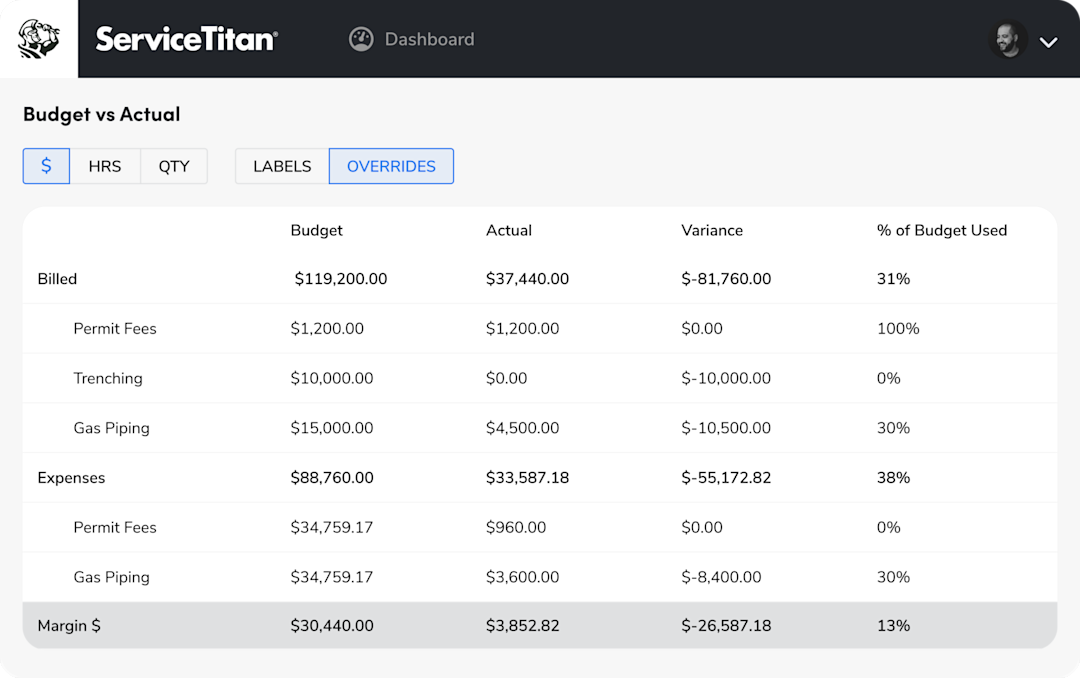
As Vanessa Gonzales, co-owner and founder of Albuquerque Plumbing, Heating & Cooling Inc., explains:
“You can make [ServiceTitan project cost tracking] as detailed as you need, break it down by department, phase of the project, and see where you stand on which phase has been billed.”
ServiceTitan's Forecast Project Costs functionality lets you enter estimated remaining costs and calculate your forecasted final project cost and margin. This helps you anticipate potential overruns while there's still time to adjust.
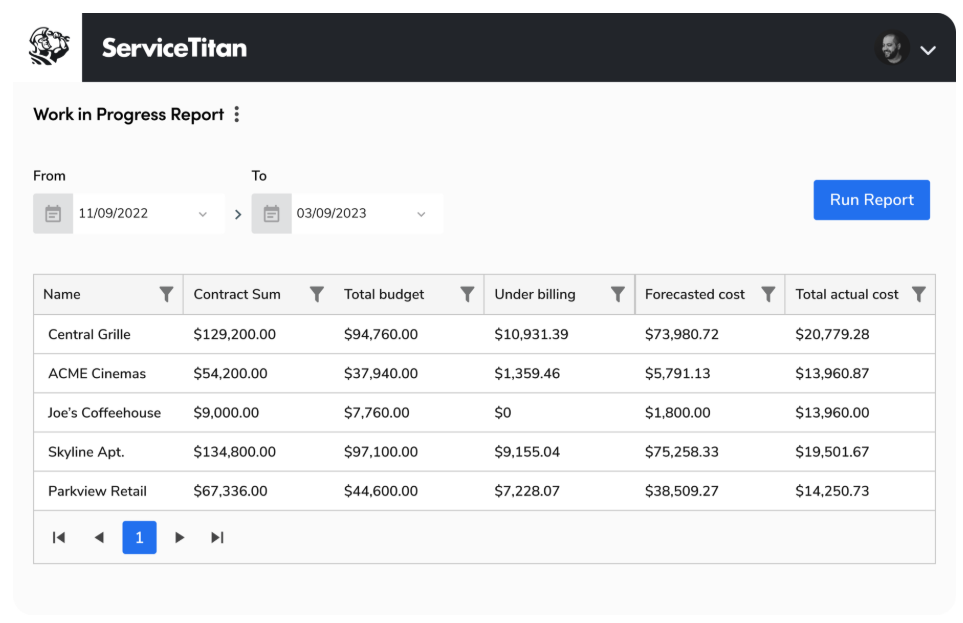
For broader financial reporting, the Work in Progress (WIP) Report helps you monitor overbilling and underbilling and assess whether project revenue is keeping pace with costs incurred.

Control costs from estimating through purchasing
Cost tracking starts before work begins. ServiceTitan lets you create project estimates and establish budgets that you can compare with actual expenses as work progresses.

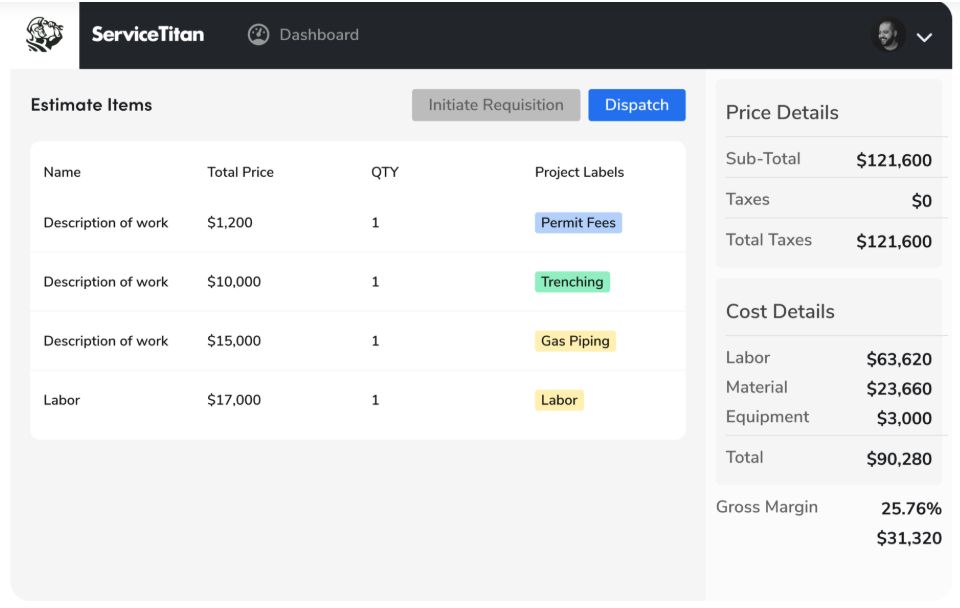
You can use Project Labels to organize project costs and revenue by category or phase, making it easier to understand where you're spending money. ServiceTitan also supports supplier catalog integrations to help you maintain material pricing information.
Teams use the estimate as a baseline to evaluate the financial performance of a project as work progresses.
Once work begins, ServiceTitan's Purchasing & Inventory capabilities help you manage material purchases and track project-related purchase orders.

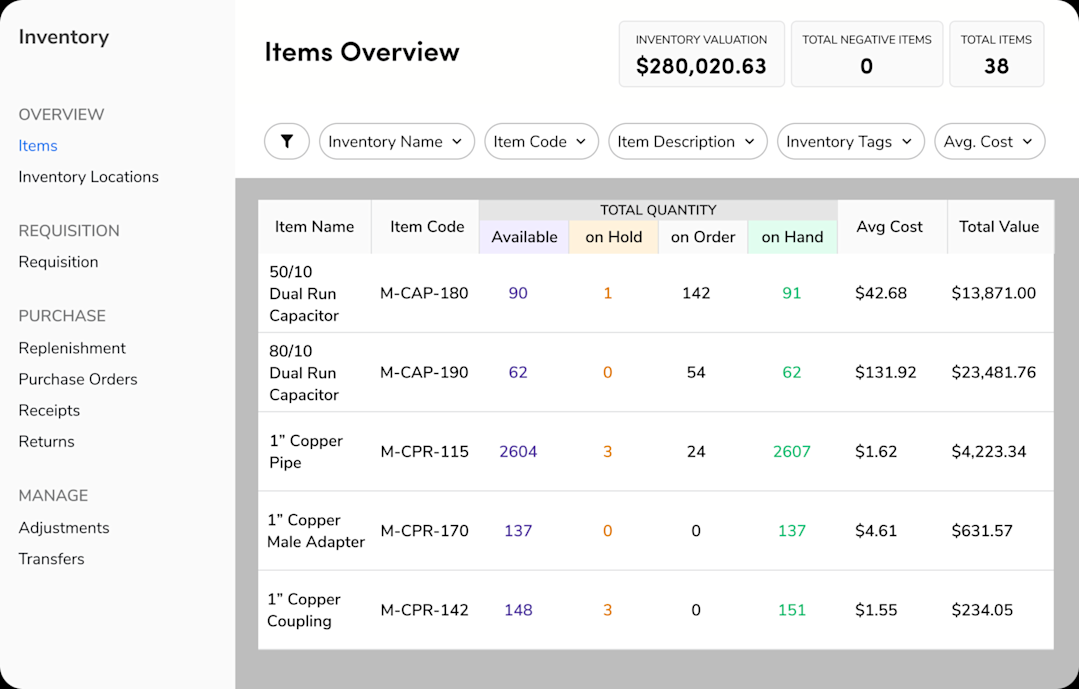
You can also review outstanding purchase-order commitments alongside actual costs in Budget vs. Actual, giving you a clearer picture of expenses you've already committed to but haven't yet recorded as actual spending.
Keep billing, project costs, and accounting connected
ServiceTitan also connects cost tracking with the financial side of a project.
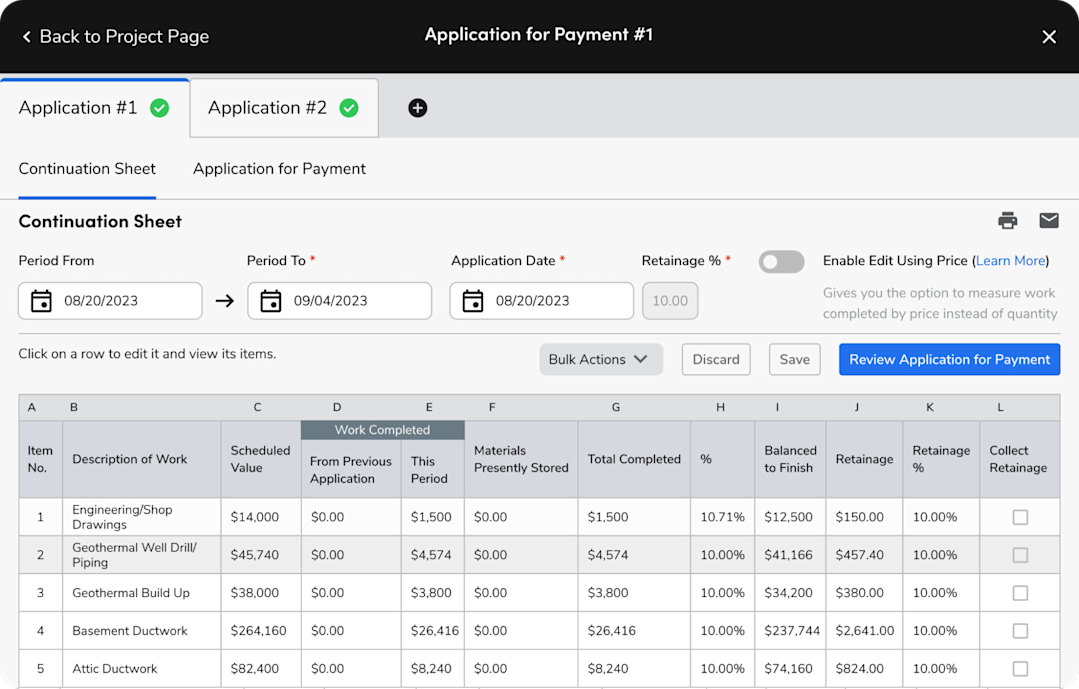
Its Progress Billing feature lets you bill customers as project milestones are completed. For contracts requiring AIA-style billing, you can use Applications for Payment and Schedules of Values to document completed work and request payment.

ServiceTitan's RFIs & Change Orders workflows also help you manage project changes. You can record approved cost adjustments in your project budget and account for approved change orders in your billing documents.

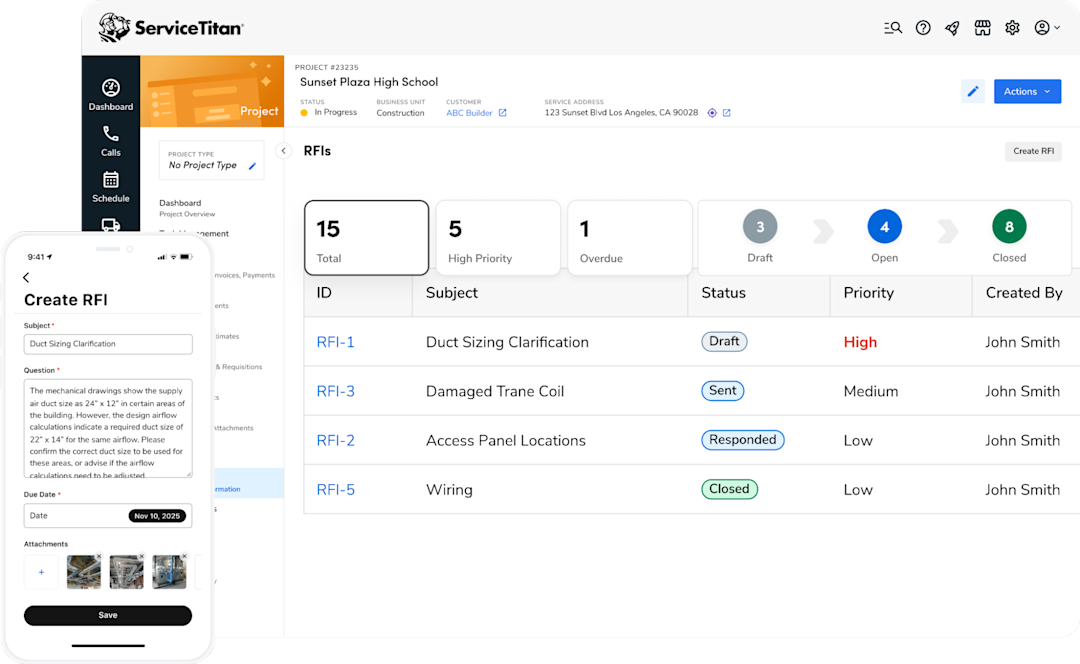
Together with ServiceTitan's accounting integrations, these workflows help you keep project costs, billing information, and financial records connected, reducing the need to reconcile information across disconnected systems.
This ensures that your account information remains accurate throughout the project life cycle.
Over to You!
Accurate construction cost tracking helps you to understand where your money goes and make informed decisions before unexpected expenses affect your project margins. Keep your cost records current, compare spending against your budget regularly, and update your forecasts as work progresses.
ServiceTitan brings project costs, purchasing, and financial reporting together so you can monitor spending and spot potential overruns without relying on disconnected spreadsheets. Book a demo to learn more about ServiceTitan’s capabilities.
ServiceTitan offers a comprehensive construction business software solution that connects project management, field operations, purchasing, and financial workflows. It helps you manage construction projects from planning through billing while keeping project information accessible in one system.


Frequently Asked Questions (FAQs)
Here are answers to some common questions about construction cost tracking.
Q1. What are the most common construction cost tracking mistakes?
Common mistakes include not recording all project expenses, using inconsistent cost codes, and delaying cost updates. Inaccurate data entry or relying on outdated financial information can also distort your project's financial position.
Q2. What are construction cost tracking best practices?
Start with a clear project budget and consistent cost codes that reflect how you organize expenses. Record costs as they occur and regularly compare actual spending with your budget. Update cost-to-complete forecasts throughout the project and assign responsibility for collecting, reviewing, and reporting cost information.
Q3. What features should construction cost tracking software have?
Look for software with budget-versus-actual comparisons, cost codes, committed cost tracking, cost-to-complete forecasting, and project financial reports. Features that connect field and financial data, reduce manual entry, and integrate with your accounting system can also help you keep cost information current.
ServiceTitan Software
ServiceTitan is a comprehensive software solution built specifically to help service companies streamline their operations, boost revenue, and substantially elevate the trajectory of their business. Our comprehensive, cloud-based platform is used by thousands of electrical, HVAC, plumbing, garage door, and chimney sweep shops across the country—and has increased their revenue by an average of 25% in just their first year with us.