Electrician website templates are prebuilt website layouts that electrical contractors can customize with their business information, services, service areas, and branding.
Templates help you establish your online presence and make it easy to present your services and be found when a homeowner searches for a local electrician.
But there are a few things to look for in an electrician website template:
Mobile-friendly design
Clear contact info and forms
Local SEO optimization
Ability to showcase reviews and testimonials
Integrations with the tools you use
In this guide, we’ll look at how you can evaluate these for the templates you’re considering, the types of templates that are available, and how you can choose the one that fits your business best.
» Want to grow your electrical business? Click here to get a demo.
Why Do Electricians Need a Professional Website?
A professional website helps electricians get found by local homeowners, build trust, and capture leads even when no one can answer the phone.
It can help you solve several common business problems:
Low local visibility: When homeowners need an electrician, they often search for ‘electrician near me’ using their phone. BrightLocal’s Consumer Search Behavior report found that 73 percent of these searches are done on mobile. If you don’t optimize your website for mobile searches, your potential customers won’t be able to find you.
Not enough social proof: Homeowners want to know they can trust the electrician they hire. According to BrightLocal, 41 percent of consumers always read reviews when browsing local businesses. The best electrician websites solve this by letting you add reviews and testimonials that build trust.
Missed after-hours leads: Electrical problems don’t always happen during business hours. A homeowner can lose power or discover a faulty breaker late at night and start looking for an electrician right away. Online forms and appointment booking let you capture electrical leads 24/7.
No clear licenses and proof of insurance: Relevant electrician licenses and proof of insurance help homeowners verify that they’re dealing with a legitimate electrical contractor. Displaying this information on your website makes it easier for potential customers to check your credentials before contacting you.
The #1 newsletter for the trades.
Features that an Electrician Website Template Should Include
When comparing electrician website templates, look for features that make your site easy to use, help customers contact you, and support your day-to-day electrical business needs:
Mobile-first design: Homeowners primarily use their phones to find your business website, so make sure it looks great on mobile. Otherwise, you’re losing customers before they’ve scrolled through your site.
Click-to-call button: When a customer needs an urgent electrical repair, they should be able to call you now. In these cases, a click-to-call button and an unmissable phone number capture the lead, without the need for any form-filling, while intent is still high.
Service area pages: If you serve multiple cities or distinct markets, your site template should let you create dedicated pages with useful information for customers in each area. These pages can help you target relevant local searches while clearly showing homeowners where you provide electrical services.
Reviews and testimonials: Real customer reviews drive credibility. So, look for a template that lets you prominently display customer reviews and testimonials across relevant pages.
Online booking: Choose a template that supports online booking or integrates with your scheduling software. This lets homeowners request or schedule service directly from your website instead of waiting until your office is open.
Trust signals: Besides reviews and testimonials, your website should also display your license number, certification, warranties, and proof of insurance.
Types of Electrician Website Templates
Electrician website templates range from simple DIY options to more integrated solutions, with different trade-offs in cost, customization, technical effort, and business integration.
Drag-and-drop website builders
Platforms like Wix and Squarespace are easy to set up and relatively affordable. They offer plenty of electrician website design flexibility, but you have fewer options for advanced integrations or highly customized functionality as your business grows.
WordPress themes
WordPress templates from marketplaces such as ThemeForest and Colorlib give you more control over your site's design and functionality. You can customize many themes with WordPress’s Block Editor or use page builders such as Elementor Pro to make editing easier. However, you still need to manage hosting, software updates, security, and compatibility between plugins. This means more ongoing maintenance or outside technical support.
HTML templates
The same marketplaces that offer WP themes also sell HTML templates, which provide prebuilt website layouts built with code. While they are highly customizable, you need developer skills to edit the code to your liking. This option makes more sense if you already have a developer and want greater control over the site's code and functionality.
Trade-specific templates
Trade-specific templates are designed for home service businesses and can include layouts for services, service areas, reviews, calls to action, and appointment requests. While they don’t require as much customization, features and integration options vary by provider. So check what is actually included before choosing one.
Integrated website platforms
Integrated website platforms connect your website with other business tools, such as scheduling, customer management, marketing, or reporting. This integration reduces manual work and keeps website leads connected to the systems your team already uses. Still, these platforms typically cost more than standalone templates and can offer more functionality than a small electrical business needs.
Evaluating and Choosing the Right Template
The right electrician website template fits how your business operates today without limiting what you can do as it grows. Look beyond the initial price and consider the long-term value each option can provide.
Compare the total cost, not just the starting price. A free or low-cost template can still require paid hosting, plugins, maintenance, security, or developer support. Add up both the upfront and ongoing costs before comparing it with a paid template or integrated platform.
Check the lead-generation features. Make sure the template supports the features customers need to contact you, such as click-to-call buttons, contact forms, and online booking. Also check whether you can create service and service area pages as your website grows.
Make sure it integrates with your existing tools. Check whether the template or website platform can connect with the software you use for scheduling, customer management, and other day-to-day operations. Without those integrations, your team might have to manually transfer website leads or appointment requests into other systems.
Choose based on your current needs and growth plans. If you’re a solo electrician with a simple service offering, a basic website builder might be enough. On the other hand, if you’re a growing electrical business with more technicians, service areas, and leads, you need better integrations, online scheduling, and tools that reduce manual work.
Optimizing an Electrician Website Template for Local SEO
To optimize your electrician website for local SEO, make it clear where you work, what services you provide, and how customers can contact you:
Optimize your Google Business Profile (GBP): Keep your business information, service areas, hours, services, and website link accurate and up to date.
Create useful service area pages: If you serve multiple cities or distinct areas, create dedicated pages for each one with relevant information about the electrical services you offer there.
Keep your business information consistent: Use the same business name and phone number across your website and Google Business Profile. If you display a business address, make sure it's accurate and consistent as well.
Use relevant local keywords naturally: Include the cities and service areas you actually serve in relevant page titles, headings, and copy, where they help customers understand your coverage.
Keep your site fast and mobile-friendly: Compress large images, avoid unnecessary plugins, and choose a template that performs well on mobile devices. A faster site gives homeowners a better experience and makes it easier for them to browse your services or contact you.
Best Practices for Launching an Electrician Website
Before launching your electrician website, test it from a potential customer's perspective and fix anything that could prevent them from contacting or booking your business:
Choose a simple domain name: Use your company name when possible and choose a domain that's easy for customers to remember and type.
Test the site on mobile devices: Open every important page on a phone and check that the text is readable, buttons are easy to tap, forms work, and the navigation displays correctly.
Set up analytics and call tracking: Make sure you can measure website traffic, form submissions, calls, and other important conversions from the day your site launches.
Test every form and booking option: Submit a test inquiry and appointment request to confirm that the information reaches the right person or system.
Add real photos of your business: Use photos of your team, vehicles, and completed electrical work instead of relying entirely on generic stock images. You can also create project galleries to show customers examples of your previous work.
Check your phone number and click-to-call buttons: Make sure your phone number is easy to find and that every click-to-call button uses the correct number.
How ServiceTitan Connects Your Website to Your Electrical Business
ServiceTitan’s Electrical Contractor Software brings essential tools for managing your electrical business into one platform. These include scheduling, dispatching, customer management, invoicing, reporting, and more.
You can also extend these capabilities with add-on products that connect your website and electrician marketing activities to ServiceTitan. Check out how these add-ons can help you get more value from your electrician website.
Let customers book jobs directly from your website
With Scheduling Pro, customers can book jobs online 24/7 based on your real-time availability. The scheduler connects with your ServiceTitan dispatch board and follows the scheduling rules you set.

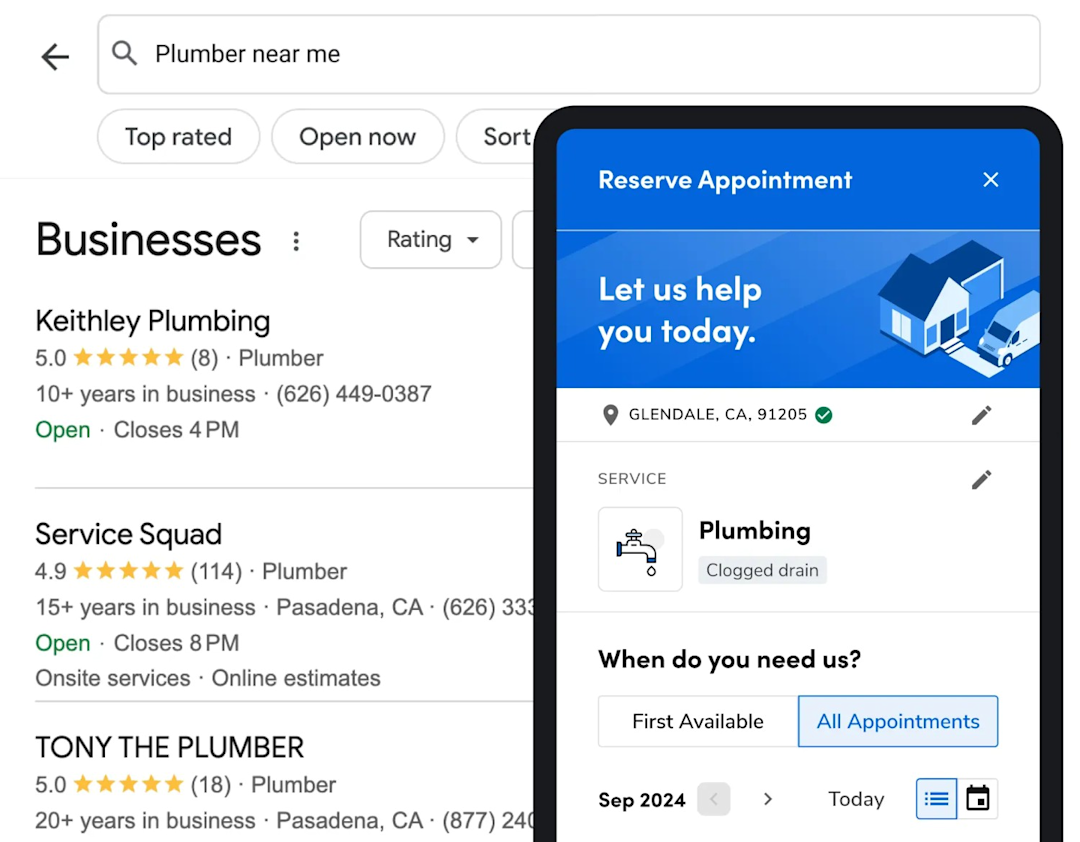
You can customize the scheduler to match your workflows and branding, and add it to your electrician website. Customers can then choose an available appointment without your team manually transferring requests from a contact form into your scheduling system.
Scheduling Pro also supports bookings through other channels, including Google and social platforms. This lets you manage online bookings from multiple sources through the same system.
Follow up with website leads faster
A website can generate leads around the clock, but those leads can lose value if no one responds quickly.
Marketing Pro’s AI-powered Agents can follow up with new leads in seconds. They can respond to leads from your website, phone, or other sources.
For example, an AI Agent can text someone who submits a website inquiry after your office has closed. Instead of waiting until the next business day, the potential customer gets an immediate response.

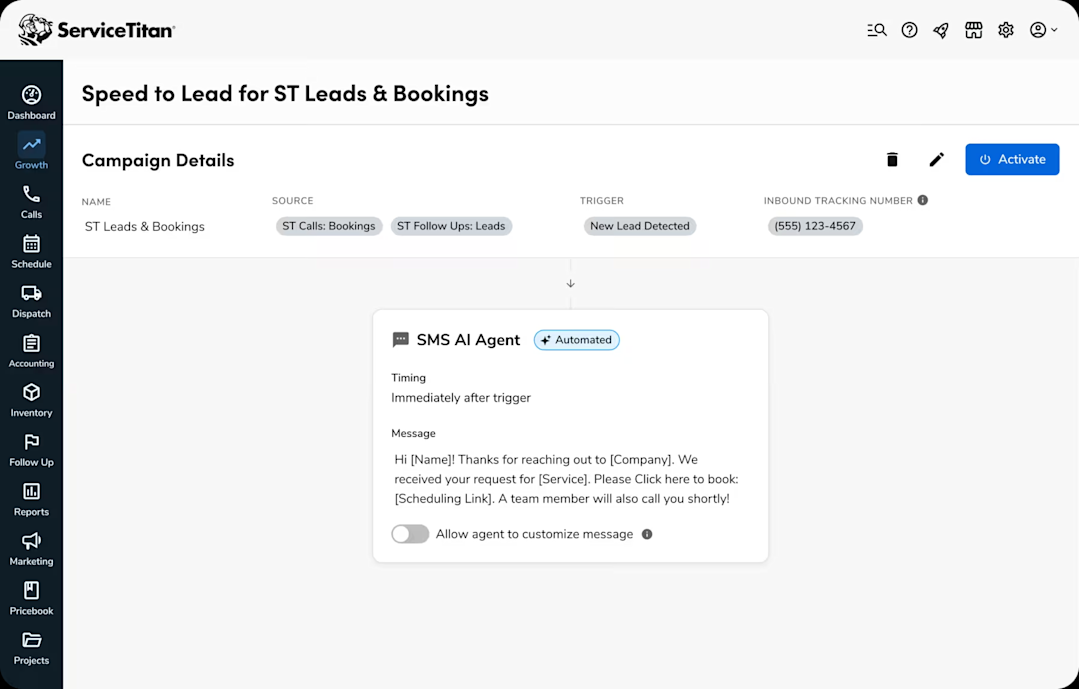
You can customize the initial message and follow-up timing and track conversations in ServiceTitan. This helps your team respond to new opportunities without requiring someone to be available every time a lead comes in.
Turn completed jobs into more reviews
Marketing Pro’s Reputation feature helps you continue the customer journey after a job is complete. You can automatically send review requests by SMS or email and manage reviews from Google, Facebook, and Yelp in one place.

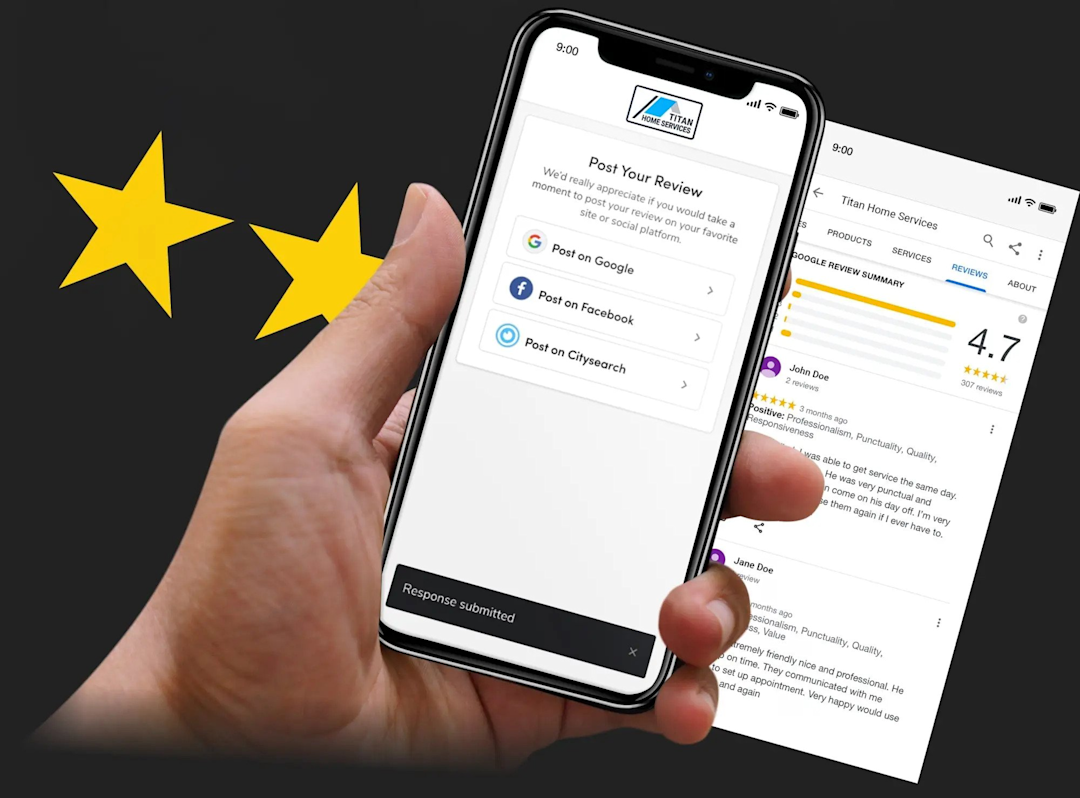
ServiceTitan can also connect reviews with the customers, jobs, and technicians behind them. This gives you more context about the feedback your business receives.
The Reputation feature also helps you keep your business information consistent across more than 60 listing sites. This supports the local online presence homeowners use to find and evaluate electrical businesses.
Connect marketing leads to jobs and revenue
Website traffic and form submissions only tell you part of the story. You also need to know which marketing efforts result in calls, booked jobs, and revenue.
Marketing Pro’s Ads connects Google Ads and Google Analytics data with your ServiceTitan data. This lets you measure performance beyond clicks and leads. Dynamic Call Tracking can also connect calls with their marketing sources and resulting jobs and revenue.
ServiceTitan supports web form attribution as well. You can use it to connect leads submitted through your website with the marketing sources that generated them.
Together, this data gives you a clearer picture of which marketing channels contribute to your electrical business. You can then make better-informed decisions about where to spend your marketing budget.
Over to You!
The right professional electrician website template should make it easy to build a professional site that works for both your customers and your team.
You don’t need the cheapest option or the one with the longest feature list. Instead, choose a template that suits how you run your business and can adjust to your changing needs. Whether that’s a simple website builder or a more integrated platform, it all depends on how much functionality you actually need.
ServiceTitan offers a comprehensive electrical software solution that helps electrical businesses manage their work from the first customer interaction through job completion and beyond. It brings key office and field workflows together in one system, with optional products available for businesses that need additional marketing and customer experience capabilities.


Frequently Asked Questions (FAQs)
Q1. What are common mistakes electricians make with website templates?
Common mistakes include choosing a template based only on its upfront price, overlooking ongoing costs, and failing to check how well it works on mobile devices. Electricians should also check whether the template supports the website features and integrations their business actually needs.
Q2. How do you customize an electrician template for your brand?
Customize an electrician website template with your logo, brand colors, business information, and real photos of your team and work. Replace the template's placeholder copy with content that reflects your business, services, and the areas you serve.
Q3. What trust signals should the template support?
An electrician website template should give you prominent places to display electrician licenses, certifications, proof of insurance, customer reviews, warranties, and real photos of your work. These details help potential customers verify your credentials and feel more confident contacting your business.
Q4. How important is mobile responsiveness for electrician websites?
Mobile responsiveness is essential for an electrician website because many local searches start on mobile devices. Your template should make text easy to read, navigation simple to use, and buttons and forms easy to tap on smaller screens.
ServiceTitan Electrical Software
ServiceTitan is a comprehensive electrical business software solution built specifically to help service companies streamline their operations, boost revenue, and achieve growth. Our award-winning, cloud-based platform is trusted by more than 100,000+ contractors across the country.