The power of an electrician invoice app lies in replacing manual paperwork with automated processes that save time and reduce billing errors.
If you’re looking for the best electrician apps, here are some of the top options:
ServiceTitan
Joist
JobFLEX
Housecall Pro
Jobber
Service Fusion
FieldEdge
In this guide, you’ll find a detailed comparison of the leading invoice apps, including their key features, pricing, pros and cons, and who they’re best for. We’ll also explain how these apps improve cash flow and what they should include.
Disclaimer: This article was created by ServiceTitan and references its own products and services. The content reflects the author’s perspective and is based on publicly available information, accurate as of August 2026. The tools are listed for informational purposes and are not ranked or endorsed.
» Want to grow your electrical business? Click here to get a demo.
How Do the Top Electrician Invoice Apps Compare?
The good news is that there’s no shortage of options. If you’re a self-employed electrician, you might only need a fast way to send invoices. But if you’re a growing company, you might require scheduling, dispatching, and reporting alongside invoicing.
Here’s how our options compare side-by-side.

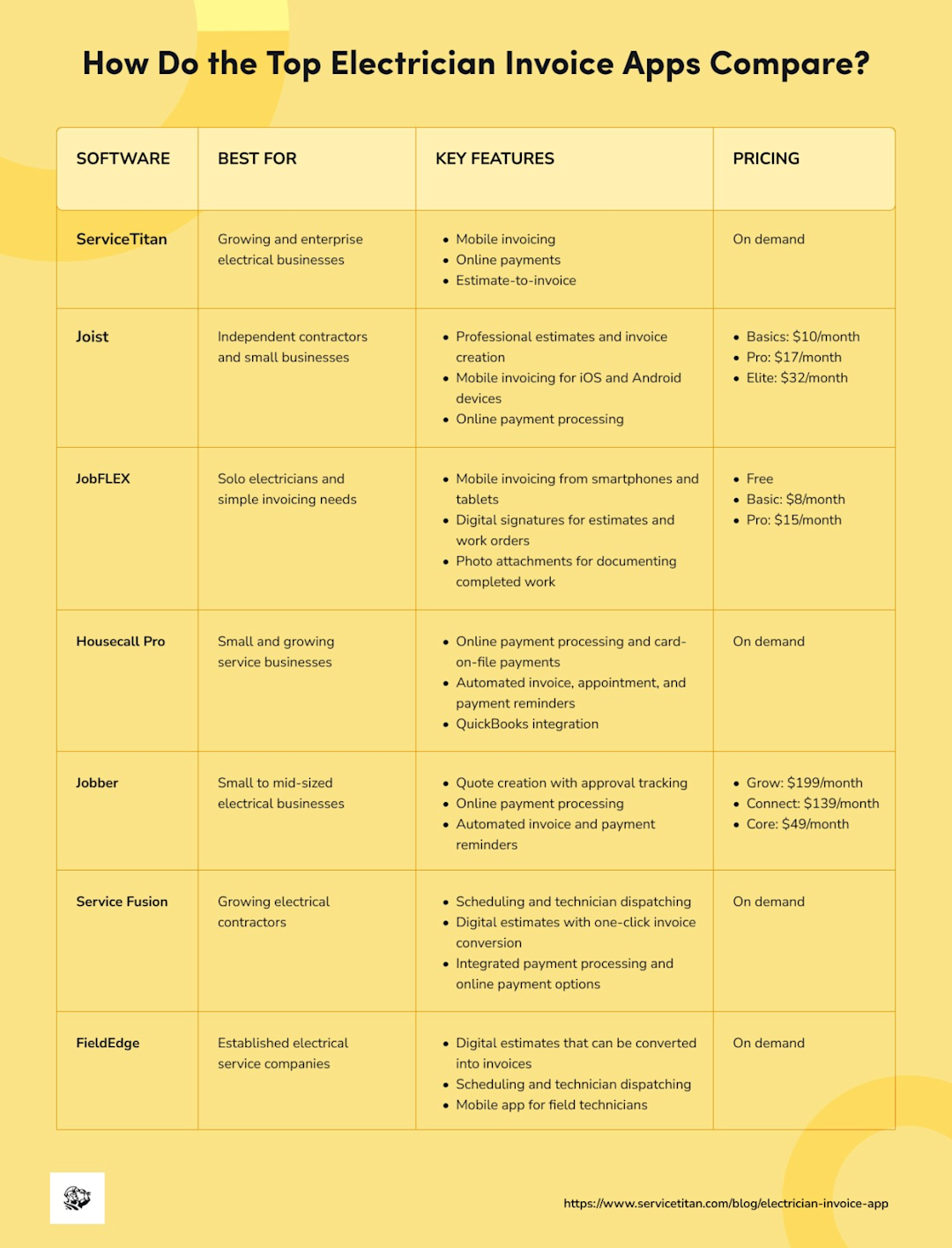
Now, let’s take a closer look at each invoice app.
The #1 newsletter for the trades.
ServiceTitan
ServiceTitan is a cloud-based field service management platform built for home and commercial service businesses, including electricians. It also has a powerful mobile app that lets you dispatch crews, invoice jobs, and email a payment link before leaving the job site.


Image Source: ServiceTitan
With ServiceTitan, you can perform your invoicing tasks with ease, from creating the invoices to keeping track of them. Here’s how the process goes:
Configure the foundational settings that controls how invoices behave
Add your company logo, message, phone number, and address
Determine whether you need signatures on your invoices and how you can capture them
Decide if your technicians must include a summary before closing out an invoice
Once you complete the setup, create, send, and manage invoices from the office and in the field. ServiceTitan has bulk actions, templates, and automations built-in to simplify the process even further.
Who Is ServiceTItan For
ServiceTitan is best suited for growing and established electrical pros who want to manage their entire business from a single location. It’s valuable for companies with office staff, multiple field technicians, or commercial projects that require detailed estimates, project management, or invoicing features.
Features
Techs can create and present invoices easily on a tablet or phone
Send secure links via email or text so customers can instantly pay
Automatically apply correct pricing and inventory via Pricebook sync so prices are always accurate
Build and edit invoices even without an internet connection
ServiceTitan Pricing
ServiceTitan uses custom quotes based on your business size and needs.
Pros:
Users love that they can access the app from anywhere, on any device.
The mobile app has been an extremely useful tool for organizing workflows and keeping track of jobs.
Reviewers praise ServiceTitan’s mobile app for streamlining technician dispatching and invoicing, improving productivity.
Cons:
Complete setup might take time, and there’s a learning curve to really getting it going.
Want to see how ServiceTitan works to streamline your electrical business operations? Schedule a call to get a free, live, one-on-one walkthrough of the features we describe throughout this article.
Joist
Joist is an estimate, invoice, and payment app for contractors who want to create professional bills on the spot, as well as accept business payments and make business receipts.


With Joist, you can build estimates and invoices by selecting items from a list of commonly used materials and labor rates. In addition, it’s easy to accept credit card payments from your clients so you can stop wasting hours driving around.
Who Is It For
Joist is ideal for self-employed electricians, independent contractors, and small electrical companies that primarily need an estimating and invoicing app rather than a full field service management platform.
Features
Professional estimates and invoice creation
Mobile invoicing for iOS and Android devices
Online payment processing
Digital signatures for estimates
Material, labor, and tax calculations
One-click estimate-to-invoice conversion
Joist Pricing
Basics: $10/month
Pro: $17/month
Elite: $32/month
Pros:
The app is very helpful when it comes to creating invoices and billing, especially since the app’s interface is user-friendly.
Reviewers are pleased with how Joist sends notifications (e.g., if customers opened an estimate).
Cons:
It doesn’t have a way to track costs from each job.
It doesn’t let you schedule jobs from employees.
JobFLEX
JobFLEX is an invoicing and estimating app designed for electricians who want to create invoices and estimates in minutes, either in the office or in the field.

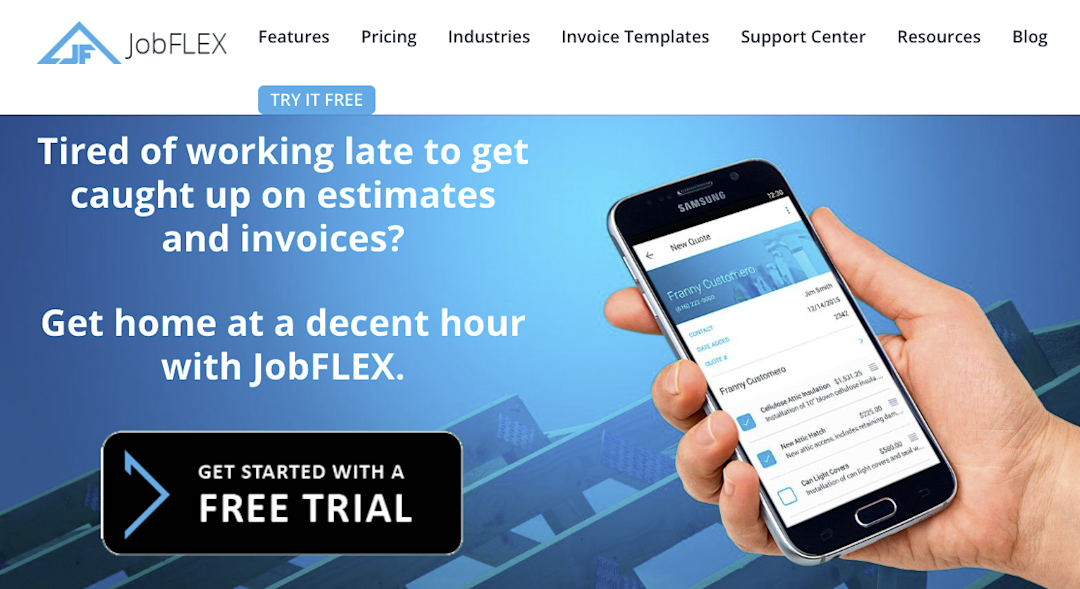
It doesn’t require an internet connection to work. So you can invoice from anywhere by quickly adding customer details, items, discounts, or even taxes with a few taps.
JobFLEX also keeps your invoices organized by month, year, and customer, including the invoice number and amount. All accessible from your phone.
Who Is It For
JobFLEX is best suited for self-employed electricians and small electrical businesses that want a simple way to create estimates, invoices, and work orders from a mobile device.
Features
Professional estimates and invoice creation
Customizable invoice and estimate templates
Mobile invoicing from smartphones and tablets
Digital signatures for estimates and work orders
Photo attachments for documenting completed work
JobFLEX Pricing
You can start using JobFLEX for free, then upgrade to a paid version:
Basic: $8/month
Pro: $15/month
Pros:
Keep in mind that we didn’t find many relevant or recent reviews for JobFlex on third-party review platforms.
The app is convenient and easy to use while working out in the field.
It’s also great for making appointments and finding jobs on the go, without having to connect to the Internet.
Cons:
Users wish JobFLEX had an integration with QuickBooks or Salesforce, especially for those who already used them.
Housecall Pro
Housecall Pro is an all-in-one field service management solution providing a suite of tools and features, including the ability to generate invoices with one click using pre-filled templates.


Image Source: Housecall Pro
The templates automatically fill with job and customer details, and then you can customize with your logo, business details, and personalized notes. Before sending, you can preview and adjust. Customers can pay the invoice with a secure card, bank transfer, and other financing options.
Who Is It For
Housecall Pro is ideal for solo electricians, small electrical businesses, and growing contractors that frequently invoice on site and collect payments instantly after completing a job.
Features
Online payment processing and card-on-file payments
Automated invoice, appointment, and payment reminders
QuickBooks integration
Scheduling and drag-and-drop dispatching
Reporting dashboards and business performance insights
Housecall Pro Pricing
While it does have a 14-day free trial, you have to contact the company for a custom quote.
Pros:
Housecall Pro is very user-friendly, which makes it easy to onboard new employees.
Reviewers are pleased with the many features Housecall Pro has that make it easier for them and their customers, such as collecting payments every month.
Customers like Housecall Pro for its ability to keep track of invoices.
Cons:
It might be expensive for smaller businesses.
Some users also mentioned that the app can get a bit glitchy.
If you want to see a full comparison between ServiceTitan and Housecall Pro, check this article.
Jobber
Jobber is a home and commercial software company that lets you generate invoices with accurate job details through customer-friendly templates with your company branding, contact information, or a disclaimer.


Image Source: Jobber
Jobber will also remind you when to invoice (e.g., after each visit, when the job is complete), as well as allow you to send multiple invoices at once with a few clicks.
Who Is It For
Jobber is best suited for solo electricians, owner-operators, and small- to mid-sized electrical businesses that want an intuitive platform to generate professional invoices.
Features
Professional invoice creation and mobile invoicing
Quote creation with approval tracking
Online payment processing
Automated invoice and payment reminders
Customer management with job history
Mobile app for field technicians
Jobber Pricing
Grow: $199/month
Connect: $139/month
Core: $49/month
Pros:
Many reviewers praise Jobber for its ease of use on both office computers and mobile devices in the field, where everything they need is right there.
People appreciate the digital notifications Jobber sends to customers and how easy it is to pay through the online portal.
Users like that it integrates with QuickBooks, allowing them to assign tasks to crew members and view schedules by team member, day, or week.
Cons:
Some users feel that Jobber’s reporting features need improvement, as there’s no ability to do custom reports.
The cost and pricing structure can be a downside for some, as it doesn’t offer a permanent free tier and the paid plans come at a higher cost.
Service Fusion
Service Fusion is another field service management software offering various features, including customer management, invoicing and payments, and time tracking.

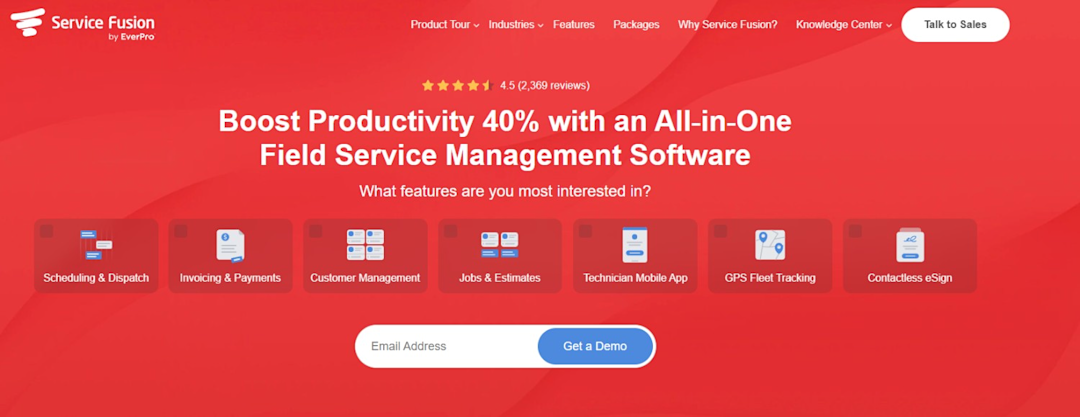
Image Source: Service Fusion
Its payment processing capabilities improve cash flow by delivering safe and convenient payment experiences and meeting customers where they are with options like paying online or on their mobile devices.
Who Is It For?
Service Fusion is best suited for small to mid-sized electrical businesses that manage recurring service calls, multiple technicians, or a steady stream of customer appointments.
Features
Scheduling and technician dispatching
Digital estimates with one-click invoice conversion
Integrated payment processing and online payment options
Customer management with complete service history
Work order and job tracking
Mobile app for technicians in the field
Service Fusion Pricing
Service Fusion offers three plans, but their website does not disclose the pricing for each.
Instead, you can find the pricing (provided by Service Fusion) on G2:
Starter: Starting at $208
Plus: Starting at $324
Pro: Starting at $533
However, it’s best to check for them for accurate and current pricing.
Pros
The setup is pretty simple, and it’s easy to understand.
Since Service Fusion connects with QuickBooks, it saves time on collecting payments.
The customer service is useful, with users’ questions always answered very quickly.
Cons
Some users suggest the mobile application needs an update and an overhaul due to lagging interfaces, slow loading times, and lack of offline capability.
Cannot add large quantities of items/inventory at once; they can only be added one at a time.
Here’s how Service Fusion compares to Service Titan: ServiceTitan vs. Service Fusion.
FieldEdge
FieldEdge is a field services management solution that helps electrical pros streamline their operations through dispatch boards, payment processing, and service agreements.


Image Source: FieldEdge
FieldEdge Payments, powered by Xplor Pay, allows technicians to accept payments on site using mobile card readers. Since all transactions are automatically synced between QuickBooks and FieldEdge, your fleet and office teams are always aligned.
Who Is It For
Primarily designed for small to mid-sized electrical contractors that want to manage scheduling, dispatching, and invoicing from one place.
Features
Professional invoice creation and mobile invoicing
Integrated payment processing
Digital estimates that can be converted into invoices
Scheduling and technician dispatching
Mobile app for field technicians
FieldEdge Pricing
Does not publicly list its pricing. You must contact the company for a personalized quote.
Pros
Users on G2 mention that FieldEdge is highly user-friendly and quick to learn.
Customer support is helpful, whether for issues or general questions.
The integration with QuickBooks is simple and fast, helping customers get to work easily.
Cons
While prices aren’t shown, some users mention that it comes at a higher cost than competitors.
Reviewers say FieldEdge struggles with scalability, advanced reporting, and even reliability.
We’ve written a detailed comparison of our product and FieldEdge, which you can find here: ServiceTitan vs. FieldEdge.
How Does ServiceTitan Handle Invoicing for Electrical Contractors?
You’ve just wrapped a large commercial rewiring project. The estimate was approved weeks ago, your technicians logged additional materials during the job, and the client wants a final invoice before you leave the site.
Instead of manually transferring these numbers from work orders and laggy spreadsheets, everything is already connected.
That’s how ServiceTitan approaches invoicing.
Its electrical invoicing software details costs for completed electrical services with digital invoices, making it easier for customers to pay online or on the spot.

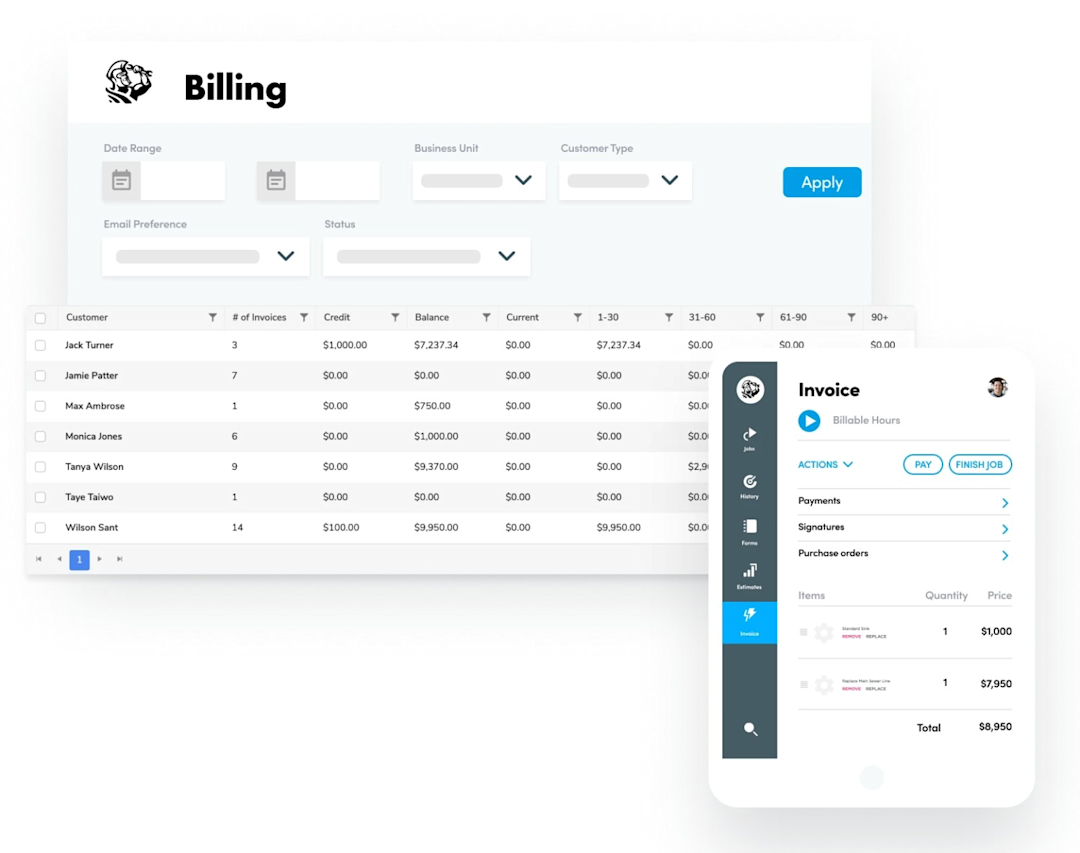
ServiceTitan invoices are clean and professional and can be delivered just like our proposals, via email, with a link to allow customers to pay online.
To reflect the balance due and all the salient details of the job, each invoice you generate features a summary providing a detailed description of work completed and the long-term prognosis, which acts like an effective guard against future disagreements.
It also allows you to accept online payments, credit cards, checks, and other payment methods through integrated payment tools.
In addition, electrical contractors can use ServiceTitan to attach before-and-after photos and video of job sites to their invoices. This feature can be especially helpful on commercial jobs where the owner is not often present, reducing denials and improving the chances of prompt payment.
Rather than functioning as a standalone invoicing tool, ServiceTitan is an all-in-one field service management platform that connects scheduling, dispatching, estimating, CRM, and payment processing.
This reduces duplicate data entry and helps ensure invoices reflect the work completed accurately and sufficiently.
What Should an Electrical Invoice Actually Include?
When a customer calls to ask why the total on their invoice is higher than expected, you’ll have the receipts to prove what went into the work.
However, if you check the document and realize it only says, “Electrical Work: $850” without any breakdown of labor, material listed, or payment terms, it can lead to payment delays and even disputes.
A well-structured invoice helps avoid all that. It should clearly outline what the customer needs to know, such as:
Your business name, logo, and contact information
The customer’s name and billing details
A unique invoice number for record-keeping
The invoice date and payment due date
An itemized list of services performed (very important!)
Labor charges, including hours worked and hourly rates (if applicable)
Materials, parts, and equipment used
Applicable taxes, discounts, or additional service fees
The total amount due
Make sure to also include payment instructions and any late payment fees. Optional notes such as warranty information, job references, or maintenance recommendations are also welcome.
The idea is to make the invoice as transparent as possible so your customers will feel more confident about paying it promptly.
How Do Electrician Invoice Apps Improve Cash Flow?
Getting paid quickly is essential for maintaining a healthy cash flow. If you’re juggling multiple jobs, material costs, and ongoing business expenses, apps help streamline the billing process, making it easier to issue accurate invoices, collect payments faster, and reduce time spent chasing overdues.
After wrapping up a full day of installations or emergency callouts, the last thing you want to do is go back to the office and create and send an invoice. Or worse, put it off until the weekend.
Chances are, your customers will put off paying, too.
With an electrical invoice app, you avoid such dreadful scenarios. Many apps allow customers to pay instantly using credit cards, bank transfers, or digital wallets. Or have automatic reminders that nudge late payers, while real-time payment tracking shows exactly which invoices are outstanding.
Some might even automate recurring invoices for ongoing maintenance contracts, so you don’t have to remember them every month.
Over to You!
At the end of the day, every electrician wants the same thing: finish a job, send the invoice, and get paid without spending hours buried in paperwork.
The right invoice app can make that happen.
Whether you’re a solo electrician or work in a mid-sized company, it can help you create invoices in minutes, accept payments on the spot, and keep track of late or outstanding balances.
If you’re looking for a solution that does more than generate invoices, ServiceTitan is worth exploring. Book a free demo today and experience how a connected workflow can help your electrical business save time and improve cash flow.
ServiceTitan is a comprehensive all-in-one solution designed to serve electrical businesses. With this tool, you can increase revenue, streamline your operations, and sustain profitable business growth.


Frequently Asked Questions (FAQs)
Q1. How do residential vs. commercial electrical invoices differ?
Residential electrical invoices focus on simple needs, such as labor, materials, service call fees, and any applicable taxes for individual homeowners.
Meanwhile, commercial electrical invoices include multiple technicians’ labor hours, project milestones, equipment rentals (if any), subcontractor costs, purchase order numbers, and payment terms.
Commercial jobs also require progress billing, retainage, or supporting documentation, making invoicing more complex than standard residential work.
Q2. Who benefits the most from electrical invoice apps?
Electrical invoice apps are valuable for businesses of all sizes, from self-employed electricians and small electrical contractors to larger companies managing multiple crews and job sites.
Features like mobile invoicing, payment tracking, customer relationship management, inventory management, and automated reminders also help you get paid faster, stay organized, and spend less time pushing papers.
Q3. What mistakes do electricians make when choosing an invoice app?
Here are some of the mistakes you can make:
Choosing the cheapest option instead of the one that best suits your workflow
Ignoring essential features such as online payments, mobile invoicing, or expense tracking
Overlooking integrations with accounting software, scheduling tools, or payment processors
Selecting an app that doesn’t scale with your business
Failing to consider ease of use, resulting in steeper learning curve for your employees
Not checking the quality of customer support or available training resources
ServiceTitan Electrical Software
ServiceTitan is a comprehensive electrical business software solution built specifically to help service companies streamline their operations, boost revenue, and achieve growth. Our award-winning, cloud-based platform is trusted by more than 100,000+ contractors across the country.